
SosialSparkLab
YouTube Channel Banner Size & Safe Area — Complete Guide (2026)
Introduction
Your YouTube channel banner is the first thing a visitor sees when they land on your channel page — and if the size is wrong, it either gets cropped awkwardly on mobile or stretches and blurs on TV screens. Getting the dimensions right once means your channel looks sharp everywhere: on a 65-inch TV, a desktop monitor, a tablet, and a phone screen all at once.
This guide covers everything you need: the correct banner dimensions, the critical safe zone, file format specs, and exactly what to put inside your banner — plus ready-made Canva templates pre-sized to every spec listed here.
The One Number You Must Know: Safe Zone
⚠️ Always design your banner's key content (channel name, tagline, logo) within the Safe Zone: 1546 × 423 px, centred. Everything outside this area may be cropped on mobile and tablet.
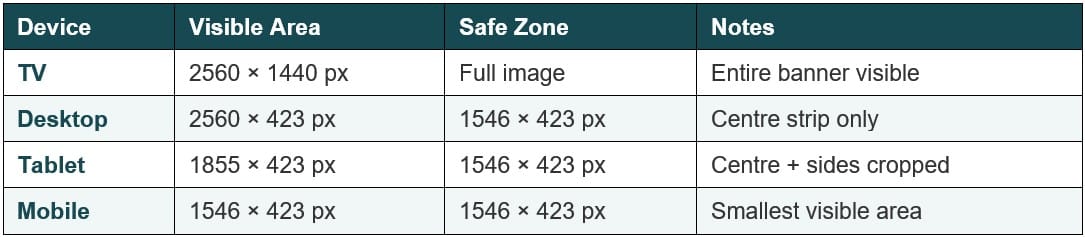
YouTube displays your banner differently depending on the viewer's device. The full 2560×1440px image is only visible on TV screens. On desktop and mobile, YouTube crops to a centred horizontal strip. The Safe Zone (1546×423px) is the only area guaranteed to show on every device.
Banner Dimensions by Device
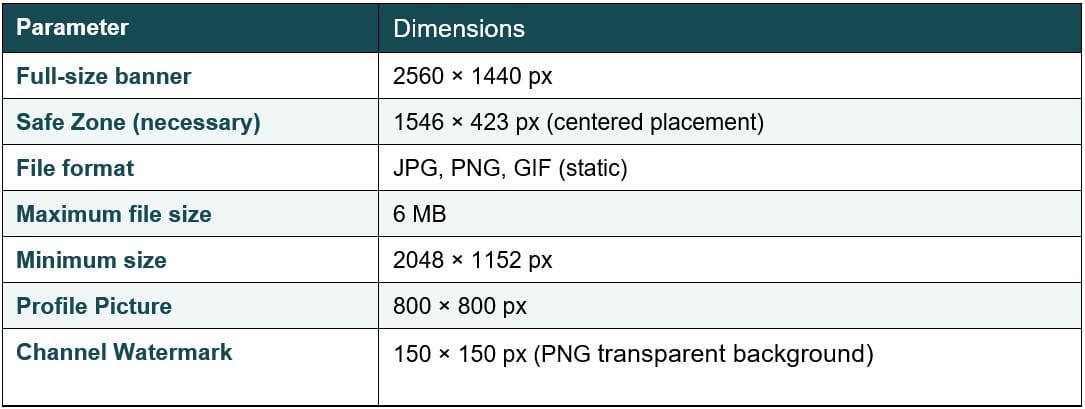
Full Technical Specs
What to Put Inside Your Banner
✅ Keep it to 3 elements max inside the Safe Zone — any more and it gets cluttered on mobile.
• Channel name — in your brand font, large enough to read at a glance
• Tagline or niche description — one short line: "Weekly Canva Tutorials" or "Finance Tips for Beginners"
• Upload schedule (optional) — "New videos every Tuesday" drives subscribers
• Logo or photo (optional) — keep it within the Safe Zone left or right side
⚠️ Never place text or logos in the corners of the full 2560×1440px canvas — they will be cropped on every non-TV device.
How to Upload Your Banner on YouTube
• Go to YouTube Studio → Customisation → Branding → Banner Image
• Click Upload → select your 2560×1440px file (JPG or PNG, under 6MB)
• Preview on desktop, tablet, and mobile using YouTube's built-in preview tool
• Confirm → Publish
Get a Pre-Sized Channel Banner Template — Ready to Edit in Canva
All Creative Fabrica channel banner templates are pre-sized to 2560×1440px with the Safe Zone already marked — no measuring, no guesswork. Pick your niche, customise your text and colours, upload in minutes.
Affiliate Disclosure: This article contains affiliate links to Creative Fabrica and Fiverr. If you purchase a product or service through these links, we may earn a small commission at no extra cost to you. We only recommend products and services we believe will benefit your YouTube channel. Read full disclosure.

YOU MIGHT ALSO LIKE

SUPER SPECIAL FONT BUNDLES
MODERN ELEGANT FONT BUNDLES

YOUTUBE THUMBNAILS BUNDLE KIT







Get a free YouTube thumbnail mini pack
Canva-ready templates + design tips straight to your inbox
By subscribing you agree to our Privacy Policy